


Returns Information
Welcome to our returns information page. Here we've answered our most frequently asked questions about returns, as well as providing easy-to-follow guides to help you create a return through both mobile and desktop devices.
HOW TO CREATE A RETURN
FREE RETURNS
All returns are quality checked – items should be returned in a new and unused condition and wherever possible sent back in the original packaging. Refunds will not be given if they do not comply with our returns policy.
Unfortunately we cannot take responsibility for any lost packages.
PLEASE NOTE: If you have previously checked out as a guest, you will need to do one of the below.
- If you have ordered from us previously on our old website then you just need to reset your password to log in and see your orders.
- If you are a brand new customer then you will need to create an account using the same email address you used to checkout as a guest, and you will see your latest order.
To do both of these things you need to navigate to the Account Icon at the top of the homepage on the website.
HOW TO RETURN ON MOBILE
- Log in to your account or sign up / reset your password.
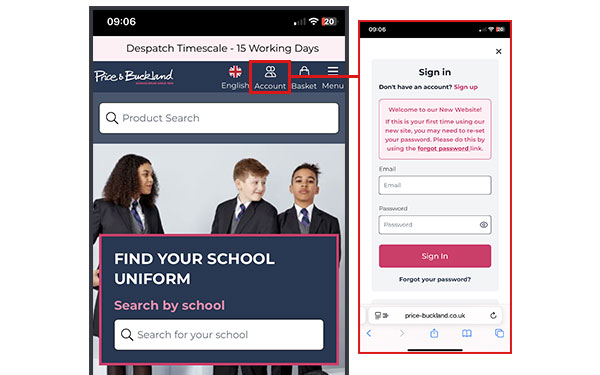
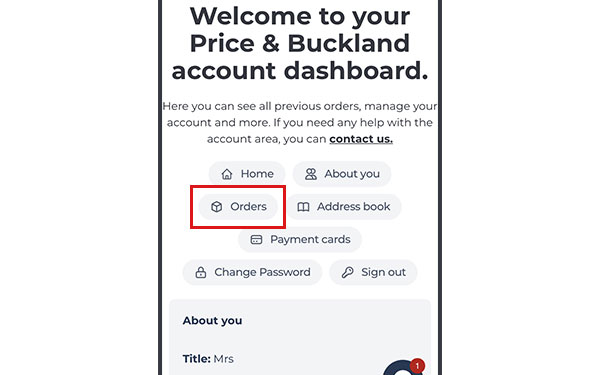
- Select the orders tab
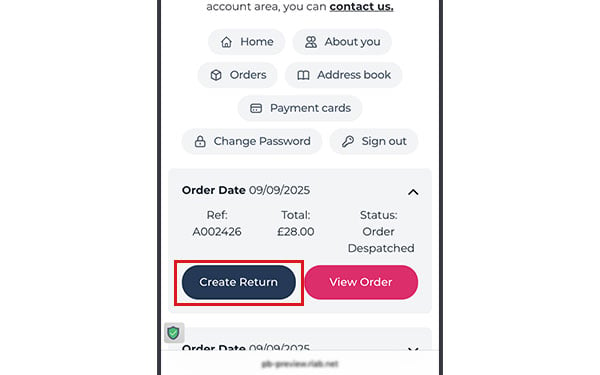
- Select the relevant order in the list and click "Create Return"
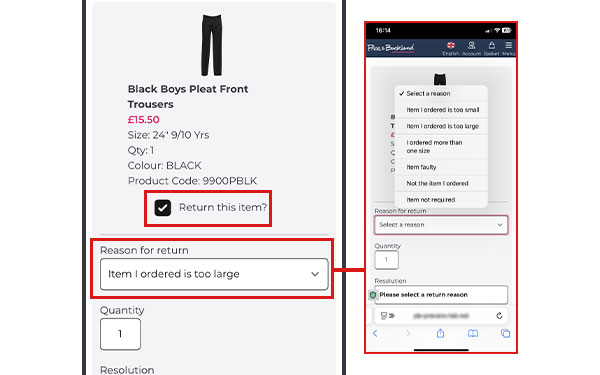
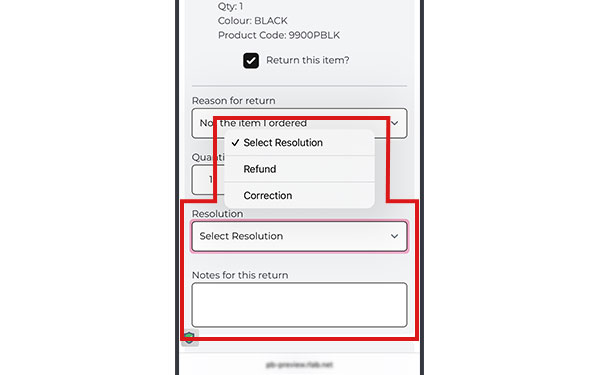
- Select each item you would like to return and a reason from the dropdown box. If you are returning more than 1 of the same item, please ensure you amend the quantity in the box.
- If required, select a resolution from the dropdown and add any important information into the notes box. PLEASE MAKE A NOTE OF YOUR ORDER NUMBER.
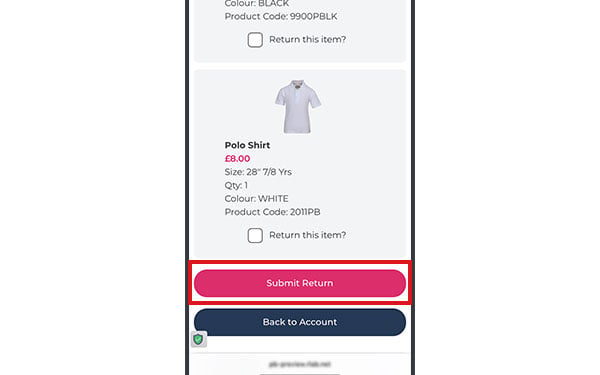
- Click "Submit Return" - This will open the Royal Mail website in a separate tab to create your free returns label. PLEASE NOTE this may take a few seconds to load. Once on the Royal Mail website please follow the instructions.
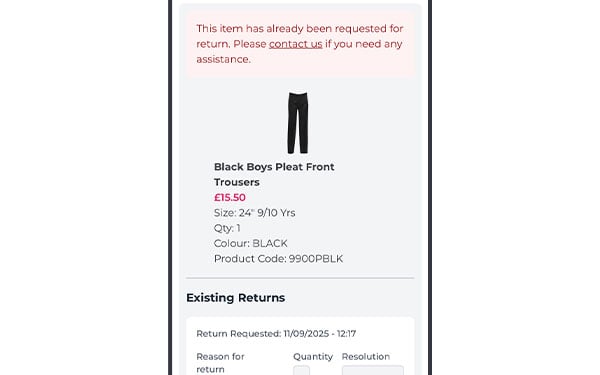
- Once requested, It will take a few minutes for your return to show in your account. If you require any further assistance, please contact us.
HOW TO RETURN ON DESKTOP
- Log in to your account or sign up / reset your password.

- Select the orders tab

- Select the relevant order in the list and click "Create Return"

- Select each item you would like to return and a reason from the dropdown box. If you are returning more than 1 of the same item, please ensure you amend the quantity in the box.
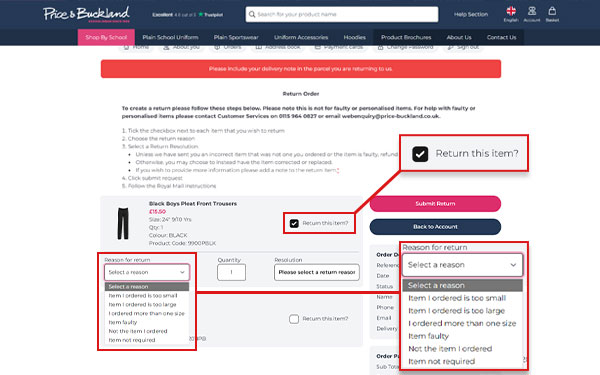
- If required, select a resolution from the dropdown and add any important information into the notes box. PLEASE MAKE A NOTE OF YOUR ORDER NUMBER.
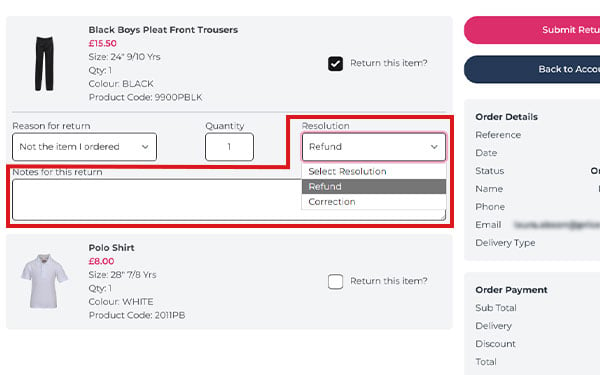
- Click "Submit Return" - This will open the Royal Mail website in a separate tab to create your free returns label. PLEASE NOTE this may take a few seconds to load. Once on the Royal Mail website please follow the instructions.
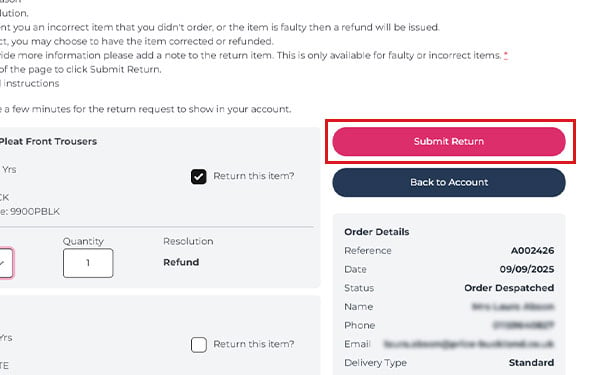
- Once requested, It will take a few minutes for your return to show in your account. If you require any further assistance, please contact us.

Frequently asked Returns Questions
Do you offer an exchange service?
Unfortunately, we are currently unable to process exchanges if you have ordered the wrong item or size.
In this instance, please return your item for a refund and then re-order.
What do I do if I have ordered the wrong item?
Currently we only offer a refund in this case. You can return your item to us within 30 days of receipt and place a new order to receive the item of your choice. We aim to process all refunds within 14 days of receiving of the original item back to us, although it is often quicker than this. You can log into your account to check the status of your return.
Please see information below on How to Return.
What should I do if I receive an incorrect or faulty item?
We're sorry to hear that you've received an incorrect or faulty item. If we have sent you an item that is not what you ordered or it has a fault then we will exchange this for you.
Please either contact us with your order number, the name/product code of the item you were supposed to receive and any further details, or use our FREE returns service. Please see the information below on How to Return and follow the instructions.
Once we receive your return we will send out the replacement within 1-2 working days via our Royal Mail first class service.
Returning items purchased with a voucher code
If you’re returning items from an order where a unique voucher code provided by a school was used – then please note the following:
- You will not receive a refund for returned items purchased using a voucher code.
- Instead, you’ll be issued a replacement voucher code for the same value for the return items.
- This new code can be used to place another order through our website.
- You do not need to return the entire order – just the item(s) you no longer need or need in a different size.
However if you have used a general voucher code for a percentage off your order, you will be refunded the price you paid which includes the discount. You will not be refunded the full price of the item.
Can I return a personalised item?
Unfortunately if an item has been personalised with initials, names or numbers then it cannot be returned.
What is your returns policy?
- Items must be returned within 30 days of receipt.
- Items must be unworn and unwashed.
- Items must have all tags attached.
- Return the package by following the instructions here: FREE RETURNS
How long does it take to process my refund?
Please allow up to 14 days to process your refund from the date we receive your return.
You will be notified by email when your return arrives back to our warehouse and is processed, provided you have logged your return in your account. You will then receive a second email when your refund has been processed.
If you have not been refunded 14 days after you receive the email to confirm we have your return, please contact us with your proof of postage information from your return carrier receipt and we will look into it for you.
Can I return an item via the school?
No, all returns have to be returned direct to us and not via the school.
Although we offer free delivery to school via courier, we do not offer a free collection service.